Usually, a virtual desktop environment does not go from functioning perfectly to completely failing overnight; it gradually shows signs of slow performance. For example, users may notice increased login times, reduced responsiveness in collaboration tools, or less reliable access to business-critical applications. These incremental reductions in functionality ultimately lead to declines in productivity, employee experience, and operational effectiveness.
While many organizations treat additional infrastructure as the solution to performance issues, such as additional compute resources, storage, and/or network bandwidth, these modern VDI performance challenges are rarely resolved by adding more infrastructure. The predominant causes of modern VDI performance problems are inefficient architecture, inefficient storage, protocol misalignment, unmanaged workloads, and environments deployed without performance and scalability in mind.
Thus, VDI performance optimization has become a chief responsibility of today’s CIO because it directly affects business resilience, productivity, and operational effectiveness.
In particular, for enterprises that manage distributed and/or hybrid workers through virtualized desktops, virtual desktop performance now also has a significant impact on their:
At Anunta, our approach to optimizing Omnissa Horizon revolves around a continuous performance optimization process that supports scalability, resilience, and a seamless employee experience.
Virtual desktops have transitioned from secondary workloads to the backbone of healthcare, financial services, engineering, and customer support environments, as well as globally distributed workforces. Scaling digital workspaces creates significant challenges for maintaining consistent performance across geographically dispersed users and locations.
A global pharmaceutical organization has faced challenges managing a distributed desktop environment critical to supporting business operations across multiple regions. As the organization has grown, the complexity of its infrastructure has led to performance variability, operational inefficiency, and increasing management overhead in its VDI environment.
By centralizing its desktop infrastructure and optimizing workload distribution, the organization improved operational stability, increased infrastructure scalability, and delivered a more consistent user experience across geographies.
This change reflects a larger trend in enterprises today. The question has shifted from, ‘Can the business count on the VDI environment for its critical operations?’ to, ‘Can the business count on the VDI environment to operate successfully across the entire organization?’
Today, CIOs are prioritizing:
This is where mature Omnissa Horizon optimization creates measurable business value by improving resilience, scalability, and employee experience.
When organizations are looking for a solution to Horizon virtual desktop latency fix, they may first assume it is a bandwidth issue. However, in most cases, various infrastructure layers are responsible for slow performance due to the enterprise workloads they support.
1. Resource Contention
When desktop pools are oversubscribed, this typically creates:
Predicting performance degradation becomes increasingly difficult as the number of concurrent users increases.
2. Protocol Misconfigurations
Display protocol settings are almost always configured using default values and are not optimized for hybrid work environments, collaborative users, or WAN users.
Even high-quality infrastructure will be perceived as sluggish when the appropriate protocol configuration is not implemented.
3. Network Latency
Small inefficiencies in a WAN can create issues for users trying to conduct Teams calls, receive timely responses from applications, maintain reliable sessions, and consistently have a positive user experience.
In a distributed enterprise, minor latency spikes can significantly impact workforce productivity.
4. GPU Starvation
Increasingly, the modern digital workplace enables CAD, medical imaging, data analytics, and video rendering applications. Without sufficient GPU allocation, high-GPU workloads compete for CPU resources, creating a lag between when a user connects and when the session becomes usable.
Considering VDI GPU acceleration best practices is therefore fundamental to the overall enterprise Horizon strategy, particularly when graphics-intensive workloads are part of the environment.
A large enterprise undergoing a major virtual infrastructure transformation faced similar scalability challenges while modernizing its Horizon environment. The organization needed to improve infrastructure efficiency and workforce responsiveness without increasing operational complexity.
By optimizing resource utilization, workload distribution, and performance engineering, the organization significantly improved the digital employee experience while achieving nearly $8 million in annual savings through infrastructure optimization and operational streamlining.
The engagement highlighted a growing reality in enterprise VDI strategy: performance optimization is no longer just a technical initiative. It is a business optimization strategy that supports resilience and consistency at scale.
5. Storage Bottlenecks
Storage remains one of the biggest hidden VDI performance challenges.
Login storms, simultaneous application launches, and patch rollouts can quickly overwhelm legacy storage systems, leading to:
This challenge becomes especially critical in high-concurrency environments where uninterrupted operations are essential.
A healthcare BPM provider supporting 1,500 concurrent virtual desktops required a stable environment that could maintain responsiveness under continuous demand. Through infrastructure tuning, proactive monitoring, and intelligent workload balancing, the organization improved scalability and maintained consistent workforce productivity without compromising user experience.
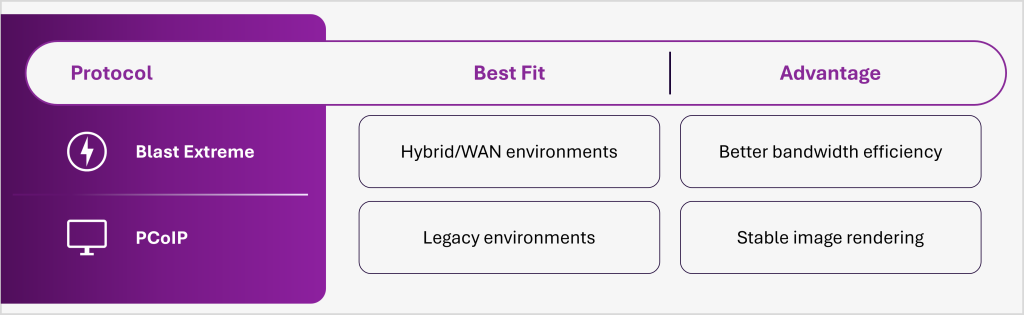
Protocol performance plays a major role in digital employee experience. For most enterprises, Blast Extreme delivers stronger scalability and bandwidth efficiency across hybrid environments.
Blast Extreme vs PCoIP
The goal is not simply desktop uptime. It is seamless digital operations at scale, supported by a consistently optimized VDI environment.
Modern enterprise workspaces are increasingly graphics-intensive, making Omnissa Horizon vGPU configuration essential for performance consistency.
Enterprises should:
Without GPU acceleration, rendering shifts to the CPU, causing instability across the environment.
Storage issues rarely announce themselves loudly. Instead, they quietly stretch login times, slow application launches, and create unpredictable user experiences.
During login storms, hundreds of users simultaneously request desktop resources. Traditional storage systems often struggle to absorb these sudden read/write spikes.
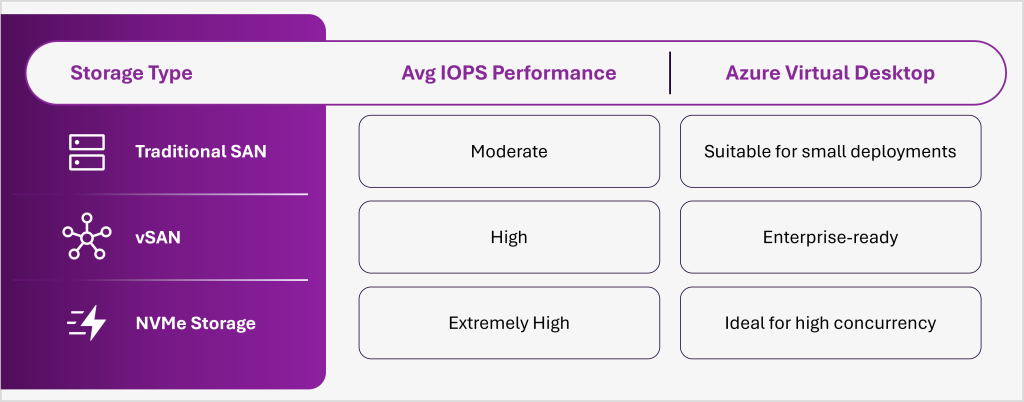
At Anunta, storage architecture is engineered around a predictable user experience rather than theoretical infrastructure capacity. That distinction becomes critical when thousands of concurrent sessions are involved.
In most Omnissa Horizon vs Citrix performance comparison discussions, both platforms offer enterprise-grade VDI capabilities. However, many organizations prefer Horizon for:
The defining factor for enterprise VDI moving forward is not the size of the underlying infrastructure; it is ensuring that everyone has the same level of performance in their digital workspaces. As businesses embrace ever-evolving hybrid work models and graphics-rich workloads, VDI performance optimization will increasingly relate to:
Horizon has established itself as a highly optimized and monitored VDI solution that delivers greater scale, resilience, and consistency. Discover how Anunta’s Digital Workspace Services and Omnissa Horizon capabilities can help enterprises increase scalability, resilience, and overall digital employee experience.