Enterprises modernizing their virtual desktop environments face a strategic choice that will shape IT economics for years to come: which hyperconverged infrastructure platform should carry their VDI strategy forward, Nutanix AHV or Azure Local. Both platforms are mature, but they solve the problem differently, and the wrong fit can lock in years of licensing costs and constrained flexibility.
The tension is real. Move too fast, and an organization risks a platform that fits this year’s budget but not next year’s workload. Move too slowly, and rising infrastructure spend and aging hardware quietly erode the case for staying put. According to Gartner, total data center spending is projected to increase 31.7 percent in 2026, surpassing $650 billion, up from nearly $500 billion the previous year, a signal that budgets are expanding even as IT leaders scrutinize every dollar committed to a platform.
For VDI, the decision comes down to one question: which HCI platform best balances cost predictability, workload flexibility, multi-session efficiency, and alignment? Use workload fit, cloud strategy, and operational preference to decide—not vendor marketing or pressure to move quickly.
Hyperconverged infrastructure is no longer a niche data center choice. The global hyperconverged infrastructure market is expanding from $16.05 billion in 2025 to $19.62 billion in 2026, growing at a compound annual growth rate of 17.31 percent through 2031. That growth reflects a shift away from traditional three-tier architecture toward converged platforms that consolidate compute, storage, and networking into one software-defined system.
VDI is a major contributor to that shift. Estimates the global desktop virtualization market will reach $13.64 billion in 2026 and grow to $20.54 billion by 2031, at a compound annual growth rate of 8.53 percent. The HCI layer beneath those desktops is growing at roughly twice the rate of the VDI market it supports, a sign that platform modernization is outpacing simple seat growth.
The business cost of delaying this decision is rarely just technical. Organizations that stay on aging infrastructure past its useful life face compressed timelines once hardware fails or support windows close, forcing rushed decisions instead of deliberate evaluation. That timing mismatch, more than any single licensing figure, turns an HCI decision into a boardroom at risk rather than a routine refresh.
Understanding what inaction costs is only half the picture. The other half is understanding what each platform brings to a VDI environment, because Nutanix and Azure Local address very different priorities.
Nutanix positions itself as cloud-neutral and hardware-agnostic. AHV can run alongside other hypervisors in the same cluster, allowing organizations to phase in a migration gradually rather than forcing a single, high-risk cutover.
Technical strengths of Nutanix AHV for VDI:
Operational considerations for Nutanix AHV:
Azure Local, previously known as Azure Stack HCI, is positioned as the on premises complement to Azure Virtual Desktop. It is the more complete choice for organizations already standardized on Microsoft infrastructure and identity platforms.
Technical strengths of Azure Local for VDI:
Operational considerations for Azure Local:
The Windows 11 Multi-Session limitation for Nutanix paired with Azure Arc is not a minor footnote. Multi-session VDI is the cost engine that makes virtual desktops affordable at scale. A typical session host can support four to eight concurrent users in a shared model, dramatically reducing per-user infrastructure cost. Without multi-session support, every user requires a dedicated virtual machine, and the cost curve looks very different.
For organizations that want a Microsoft-native, on-premises VDI solution with optimal licensing and performance, Azure Local is currently the only option that combines full Windows 11 Multi-Session support with native AVD management. For organizations that prioritize hardware flexibility and cross-cloud portability over that specific efficiency, Nutanix AHV offers hardware independence, and a lower-risk phased migration path, in exchange for managing a separate hypervisor ecosystem. Azure Local is the more complete choice when Microsoft alignment is the priority.
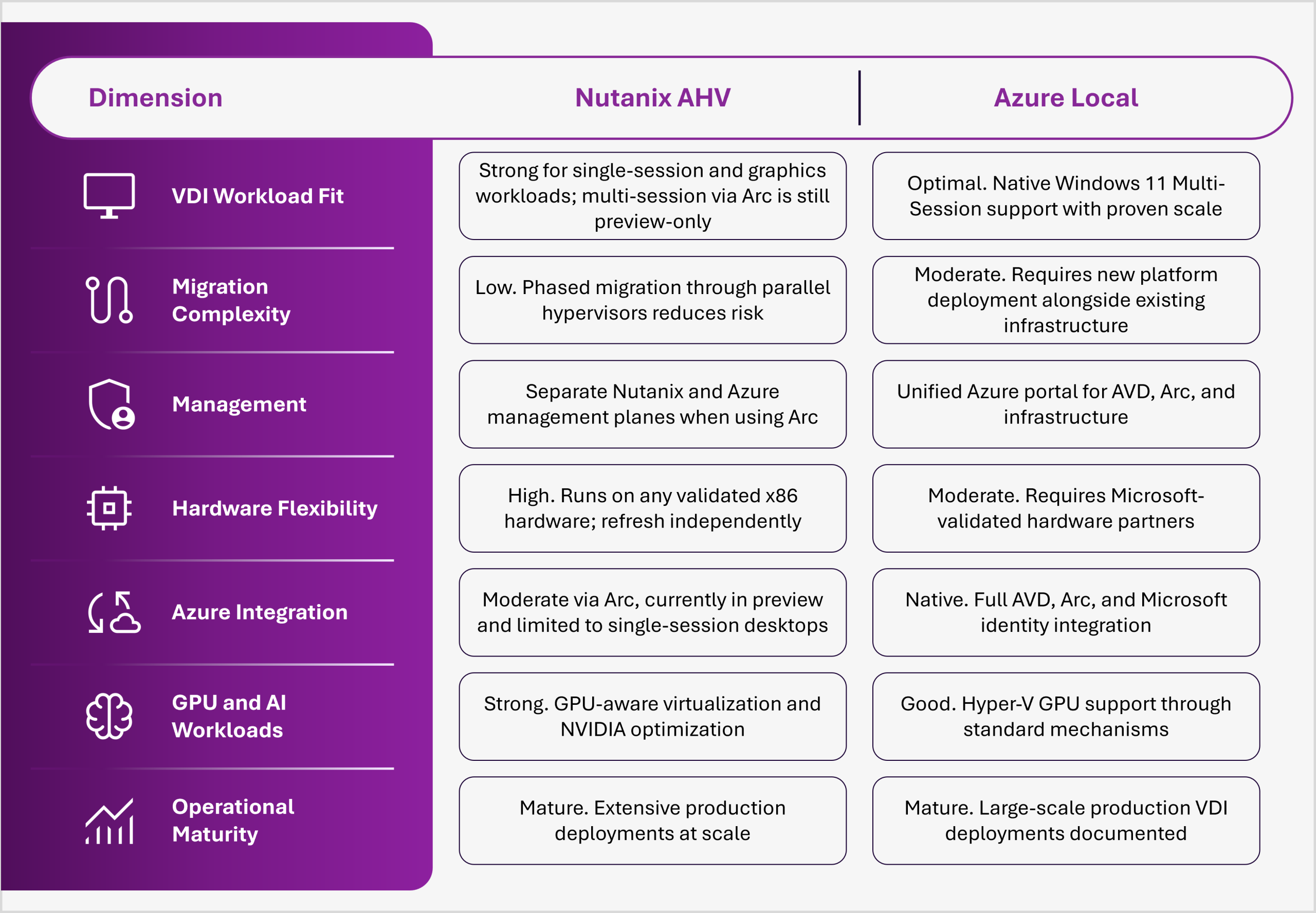
Fairly comparing HCI platforms means evaluating them across multiple dimensions, not just price or brand familiarity. Compare Nutanix AHV and Azure Local on the dimensions that most directly shape VDI strategy.
The platform decision reaches well beyond the IT department. An HCI platform that scales cleanly with headcount and application demand gives the business room to expand into new markets or stand-up new business units without a parallel infrastructure project. One that does not scale cleanly becomes a hidden brake on every initiative that depends on IT capacity.
This is why the HCI conversation increasingly belongs in front of business leadership, not just the infrastructure team. A platform choice that optimizes only for today’s licensing cost, without accounting for tomorrow’s workload mix and compliance requirements, can quietly limit competitive agility for years to come.
Understand the renewal timeline and financial exposure of the current environment. If the next hardware or hypervisor renewal is 18 to 24 months away, there is time to evaluate carefully. If renewal is imminent, accelerate the assessment, but avoid rushing into a decision under deadline pressure.
Map the actual VDI workload profile against each platform’s strengths rather than the reverse. Use session density, GPU requirements, data residency constraints, and existing cloud commitments to determine platform fit. Organizations running high-density multi-session VDI with light graphics needs typically favor Azure Local. Those running single-session or graphics-intensive workloads with existing Nutanix infrastructure have more flexibility with Nutanix AHV.
Pilot the chosen platform with a defined user group before committing to full migration. A phased approach, running the new HCI platform alongside existing infrastructure and moving user groups in planned waves, reduces disruption and builds confidence in performance and application compatibility.
Plan for six to eighteen months for large deployments, not weeks. Notably, the HCI layer is growing at a 17.31 percent CAGR, more than double the 8.53 percent CAGR of the desktop virtualization market it supports, a sign that investment is going into the platform layer itself, not just into adding more desktops.
Anunta’s own work on Azure Local reflects this kind of phased, risk-managed transition. In one engagement, Anunta helped a client migrate from a costly Citrix-based VDI environment to a production Azure Local cluster, validating performance on a smaller cluster before scaling to a six-node production environment. A temporary public cloud deployment kept desktops available during a hardware delivery delay, and the organization ultimately reduced VDI licensing costs, gained greater on-premises control, and built a scalable architecture for future projects.
Nutanix AHV and Azure Local are both credible, mature HCI platforms with real market momentum, and neither is universally better. Nutanix suits organizations that prioritize hardware flexibility and cross-cloud portability. Azure Local suits organizations that prioritize alignment with the Microsoft ecosystem and multi-session VDI efficiency at scale.
The decision should be driven by workload fit, cloud strategy, and operational preference, not by pressure to escape rising costs elsewhere or by brand familiarity. Organizations that invest time up front in mapping their constraints against each platform’s strengths make decisions that hold up over the long term, rather than repeating the same lock-in problem with a different vendor a few years later.
Anunta’s role in this evaluation is to stay vendor-neutral and focused on business strategy. We assess a current VDI environment against both Nutanix and Azure Local across the seven dimensions above, help pilot the chosen platform with minimal business risk, and provide managed implementation and Day 2 operations support regardless of which platform is selected.
Ready to evaluate Nutanix AHV or Azure Local for a VDI strategy without vendor bias? Contact us for a vendor-neutral HCI assessment tailored to your workload profile and strategic constraints.
1. Should I choose Nutanix AHV or Azure Local for my VDI environment?
It depends on existing infrastructure, cloud commitments, and workload profiles. Organizations already standardized on Microsoft and running multi-session VDI at scale typically find Azure Local’s native AVD integration, and Windows 11 Multi-Session support the most cost-effective option. Organizations prioritizing hardware flexibility, cross-cloud portability, or the ability to run alongside existing Nutanix infrastructure may favor Nutanix AHV. A workload-focused assessment of the specific environment clarifies the right fit.
2. Can Nutanix AHV run Azure Virtual Desktop?
Yes, in preview. Nutanix AHV is now a supported infrastructure for Azure Arc-enabled AVD session hosts. However, this capability does not yet support Windows 11 Multi-Session for on-premises deployments, only single-session or Windows Server hosts. Each concurrent user requires a dedicated virtual machine, eliminating the cost efficiency of shared desktops at scale. Multi-session AVD remains exclusive to Azure and Azure Local, and this hybrid capability should be treated as developmental rather than production-ready.
3. What is the cost difference between Nutanix AHV and Azure Local?
The two platforms use fundamentally different licensing models, which makes a direct comparison difficult without a specific workload profile. Nutanix uses capacity-based subscription licensing on the hardware of choice. Azure Local uses Microsoft subscription licensing tied to the Azure ecosystem. What matters most is comparing the full three-year total cost of ownership for each option against actual session host density, user count, GPU requirements, and cloud commitments. A formal TCO analysis against current licensing and renewal terms shows which path costs less in a given situation.
4. Does hyperconverged infrastructure migration disrupt a running VDI environment?
It does not have to. A phased migration, running the new HCI platform alongside the existing environment and moving user groups in planned waves, lets IT teams validate performance, test application compatibility, and build operational confidence before retiring the legacy platform. This approach takes longer than a single cutover, typically six to eighteen months for large deployments, but it dramatically reduces operational risk and business impact.
5. Is Azure Local compatible with non-Microsoft hardware or hypervisors?
Azure Local is designed for Microsoft-validated hardware partners and runs Hyper-V as its hypervisor. This approach simplifies support and interoperability but differs from a hardware-agnostic model. If hardware flexibility is the priority, Nutanix AHV offers broader vendor compatibility in exchange for managing a separate hypervisor ecosystem and its related support structure.